
“If you care about me at all, please don’t say anything to anyone. ”
正文
之前用阿里云的服务器搭建了一个挂载了阿里云盘的Alist,并反向代理到alist.sliverkiss.xyz。但由于时间过于仓促,还没来得及对alist进行美化。最近闲了下来,便打算对Alist主题进行一番整改。
网盘入口:Alist
Alist具体美化过程
首先,登录Alist,点击设置,进入全局设置页面。将美化的代码分别粘贴到自定义头部和自定义内容。
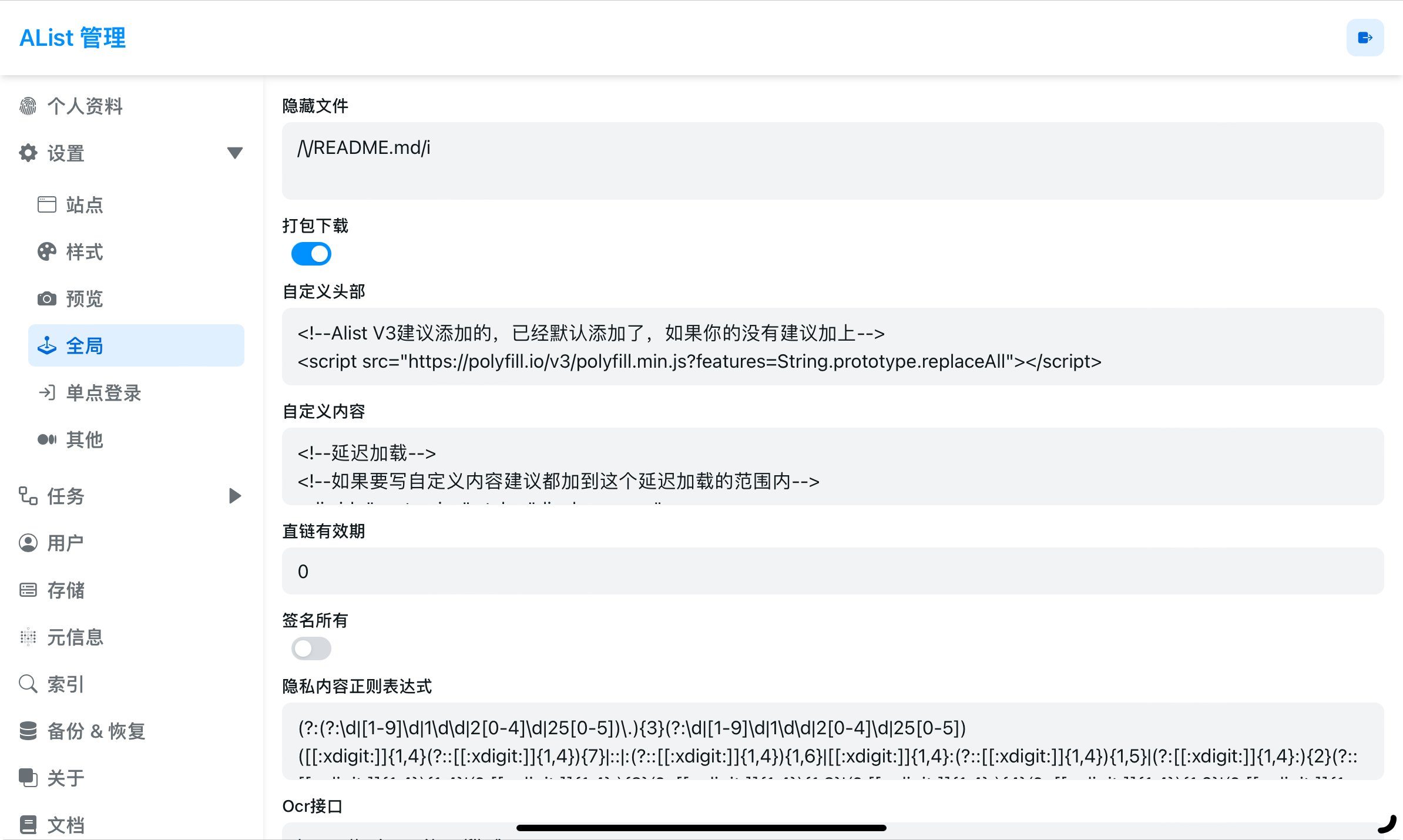
自定义头部代码如下:
<!--Alist V3建议添加的,已经默认添加了,如果你的没有建议加上-->
<script src="https://polyfill.io/v3/polyfill.min.js?features=String.prototype.replaceAll"></script>

<!-- Font6,自定义底部使用和看板娘使用的图标和字体文件-->
<link type='text/css' rel="stylesheet" href="https://npm.elemecdn.com/[email protected]/css/fontawesome.min.css"
  media='all'>
<link href="https://npm.elemecdn.com/[email protected]/css/all.min.css" rel="stylesheet">

<script src="https://eqcn.ajz.miesnfu.com/wp-content/plugins/wp-3d-pony/live2dw/lib/L2Dwidget.min.js"></script>

<!-- 看板娘 -->
<link rel="stylesheet" href="https://cdn.jsdelivr.net/npm/font-awesome/css/font-awesome.min.css">
<script src="https://cdn.jsdelivr.net/gh/stevenjoezhang/live2d-widget@latest/autoload.js"></script>

<!--音乐播放器所用的文件-->
<!-- require APlayer -->
<link rel="stylesheet" href="https://npm.elemecdn.com/[email protected]/dist/APlayer.min.css">
<script src="https://npm.elemecdn.com/[email protected]/dist/APlayer.min.js"></script>
<!-- require MetingJS -->
<script src="https://npm.elemecdn.com/[email protected]/dist/Meting.min.js"></script>

<style>
  /* 自定义字体 */

  @font-face {
    font-family: 'PingFangSC-Semibold';
    font-weight: bold;
    src: url("https://thbook.top/upload/2023/01/PingFangSC-Semibold.woff2");
  }

  .body {
    font-family: 'PingFangSC-Semibold';
    font-weight: bold;
    src: url("https://thbook.top/upload/2023/01/PingFangSC-Semibold.woff2");
  }

  .dibu {
    font-family: 'PingFangSC-Semibold';
    font-weight: bold;
    src: url("https://thbook.top/upload/2023/01/PingFangSC-Semibold.woff2");
  }

  /* 去除通知栏 右上角 X */
  .notify-render .hope-close-button {
    display: none;
  }

  /*白天背景图*/
  .hope-ui-light {
    background-image: url("https://images6.alphacoders.com/132/1327487.png") !important;
    background-size: cover;
    background-repeat: no-repeat;
    background-attachment: fixed;
  }

  background: linear-gradient(to bottom, #D5DEE7 0%, #E8EBF2 50%, #E2E7ED 100%),
  linear-gradient(to bottom, rgba(0, 0, 0, 0.02) 50%, rgba(255, 255, 255, 0.02) 61%, rgba(0, 0, 0, 0.02) 73%),
  linear-gradient(33deg, rgba(255, 255, 255, 0.20) 0%, rgba(0, 0, 0, 0.20) 100%);
  background-blend-mode: normal,
  color-burn;

  /*夜间背景图*/
  .hope-ui-dark {
    background-image: url(https://images2.alphacoders.com/743/743487.jpg) !important;
    background-repeat: no-repeat;
    background-size: cover;
    background-attachment: fixed;
    background-position-x: center;
  }

  /*主列表透明*/
  .obj-box.hope-stack.hope-c-dhzjXW.hope-c-PJLV.hope-c-PJLV-igScBhH-css {
    background-color: rgba(255, 255, 255, 0.5) !important;
  }

  /*readme透明*/
  .hope-c-PJLV.hope-c-PJLV-ikSuVsl-css {
    background-color: rgba(255, 255, 255, 0.5) !important;
  }

  /*顶部右上角切换按钮透明*/
  .hope-c-ivMHWx-hZistB-cv.hope-icon-button {
    background-color: rgba(255, 255, 255, 0.3) !important;
  }

  /*右下角侧边栏按钮透明*/
  .hope-c-PJLV-ijgzmFG-css {
    background-color: rgba(255, 255, 255, 0.5) !important;
  }


  /*白天模式代码块透明*/
  .hope-ui-light pre {
    background-color: rgba(255, 255, 255, 0.1) !important;
  }

  /*夜间模式代码块透明*/
  .hope-ui-dark pre {
    background-color: rgba(255, 255, 255, 0) !important;
  }

  /*底部CSS,.APP .tanle这三个一起的*/
  dibu {
    border-top: 0px;
    position: absolute;
    bottom: 0;
    width: 100%;
    margin: 0px;
    padding: 0px;
  }

  .App {
    min-height: 85vh;
  }

  .table {
    margin: auto;
  }

  /*去掉底部*/
  .footer {
    display: none !important;
  }


  /*渐变背景CSS*/
  #canvas-basic {
    position: fixed;
    display: block;
    width: 100%;
    height: 100%;
    top: 0;
    right: 0;
    bottom: 0;
    left: 0;
    z-index: -999;
  }
</style>
<style>
  .hope-c-PJLV-ihKMwLA-css {
    conent flex-direction: row;
    align-items: center;
    height: 44px;
    width: 200px;
  }
</style>
自定义内容代码如下:
<!--延迟加载-->
<!--如果要写自定义内容建议都加到这个延迟加载的范围内-->
<div id="customize" style="display: none;">
  <div>
    <!--音乐播放器-->
    <meting-js fixed="true" autoplay="false" theme="#409EFF" list-folded="true" auto="QQ音乐或者网易云的链接"></meting-js>

    <br />
    <center class="dibu">
      <div style=" line-height: 20px;font-size: 11pt;font-weight: bold;">
        <span>
                    <span style="color:#F0FFF0; font-weight: bold;" id="hitokoto">
                        <a href="#" id="hitokoto_text">
                            "人生最大的遗憾,就是在最无能为力的时候遇到一个想要保护一生的人."
                        </a>
                    </span>
        </span>
      </div>

      <span style="color:#F0FFF0; font-size: 12px font-weight: bold;">
        <p><a href="" target="_blank">Power of Sliverkiss</a></p>
      </span>
      <div style=color:#F0FFF0;"font-size: 12px; font-weight: bold;">
        <!-- <span class="nav-item">
                    <a class="nav-link" href="tencent://AddContact/?fromId=50&fromSubId=1&subcmd=all&uin=467234849"
                        target="_blank">
                        <i class="e-halo-icon e-halo-icon-yuwen"></i>
                        </i>
                       github |
                    </a>
                </span> -->
        <span class="nav-item">
                    <a class="nav-link" href="[email protected]" target="_blank">
                        <i class="e-halo-icon e-halo-icon-MAILBOX"></i>
                        邮箱 |
                    </a>
                </span>
        <span class="nav-item">
                    <a class="nav-link" href="http://sliverkiss.free.hr" target="_blank">
                    <i class="e-halo-icon e-halo-icon-yuwen"></i>
                        博客 |
                    </a>
                </span>
        <span class="nav-item">
                    <a class="nav-link" href="https://t.me/sliverkiss" target="_blank">
                         <i class="e-halo-icon e-halo-icon-heiban"></i>
                        Telegram |
                    </a>
                </span>
        <span class="nav-item">
                    <a class="nav-link" href="" target="_blank">
                        <i class="e-halo-icon e-halo-icon-cunchu"></i>
                        云盘 |
                    </a>
                </span>
        <!--后台入口-->
        <span class="nav-item">
                    <a class="nav-link" href="/@manage" target="_blank">
                     <i class="e-halo-icon e-halo-icon-keyanxiangmu"></i>
                        管理
                    </a>
                </span>
        <!--版权,请尊重作者-->
        <!--<span class="nav-item">
                    <a class="nav-link" href="https://github.com/Xhofe/alist" target="_blank">
                        <i class="fa-solid fa-copyright" style="color:#409EFF;" aria-hidden="true">
                        </i>
                        Alist
                    </a>
                </span>-->
        <br />
      </div>
    </center>
    <br />
    <br />
  </div>

  <!--一言API-->
  <script src="https://v1.hitokoto.cn/?encode=js&select=%23hitokoto" defer></script>
  <!--鼠标点击效果-->
  <script src="https://cdn.jsdelivr.net/gh/TRHX/[email protected]/js/maodian.js"></script>
  <!--运行时间-->
  <script type="text/javascript">
    function show_runtime() {
        window.setTimeout("show_runtime()", 1000);
        X = new Date("8/24/2022 10:28:00");
        Y = new Date();
        T = (Y.getTime() - X.getTime());
        M = 24 * 60 * 60 * 1000;
        a = T / M;
        A = Math.floor(a);
        b = (a - A) * 24;
        B = Math.floor(b);
        c = (b - B) * 60;
        C = Math.floor((b - B) * 60);
        D = Math.floor((c - C) * 60);
        runtime_span.innerHTML = "本站已运行 " + A + "天" + B + "小时" + C + "分" + D + "秒"
    }
    show_runtime();
  </script>

  <!--延迟加载范围到这里结束-->
</div>
<!--延迟加载配套使用JS-->
<script>
  let interval = setInterval(() => {
        if (document.querySelector(".footer")) {
            document.querySelector("#customize").style.display = "";
            clearInterval(interval);
        }
    }, 200);
</script>

<span id="runtime_span"></span>
<!-- 渐变背景初始化,如果要使用渐变背景把下面的那一行注释去掉即可-->
<!-- 下面的几行都是渐变的一套,自定义头部内还有一个关联的自定义CSS -->
<!--<canvas id="canvas-basic"></canvas> -->
<script src="https://npm.elemecdn.com/[email protected]/dist/granim.min.js"></script>
<script>
  var granimInstance = new Granim({
    element: '#canvas-basic',
    direction: 'left-right',
    isPausedWhenNotInView: true,
    states : {
        "default-state": {
            gradients: [
                ['#a18cd1', '#fbc2eb'],
                 ['#fff1eb', '#ace0f9'],
                 ['#d4fc79', '#96e6a1'],
                 ['#a1c4fd', '#c2e9fb'],
                 ['#a8edea', '#fed6e3'],
                 ['#9890e3', '#b1f4cf'],
                 ['#a1c4fd', '#c2e9fb'],
                 ['#fff1eb', '#ace0f9']

            ]
        }
    }
});
</script>
<!---去掉底部文字--->
<style type="text/css">
  .footer {
    display: none !important;
  }
</style>

<!---去掉.hope-c-PJLV-iicyfOA-css规则--->
<style type="text/css">
  .hope-c-PJLV-iicyfOA-css {
    width: min(99%, 980px);
  }
</style>
<!---重写.hope-c-PJLV-iicyfOA-css规则--->
<style type="text/css">
  .hope-c-PJLV-iicyfOA-css {
    width: min(99%, 70%);
  }
</style>

<!---去掉.hope-c-PJLV-iicyfOA-css规则--->
<style type="text/css">
  .hope-c-PJLV-ibwASZs-css {
    margin-right: var(--hope-space-2);
    width: var(--hope-sizes-12);
    height: var(--hope-sizes-12);
  }
</style>

<!---重写.hope-c-PJLV-ibwASZs-css 规则--->
<style>
  .hope-c-PJLV-ibwASZs-css {
    /*margin-right: var(--hope-space-2);*/
    width: 160px;
    height: var(--hope-sizes-12);
  }
</style>
如果觉得网盘展示内容过于空荡,可以在元信息新建路径,为相应的路径添加md顶部说明以及说明。
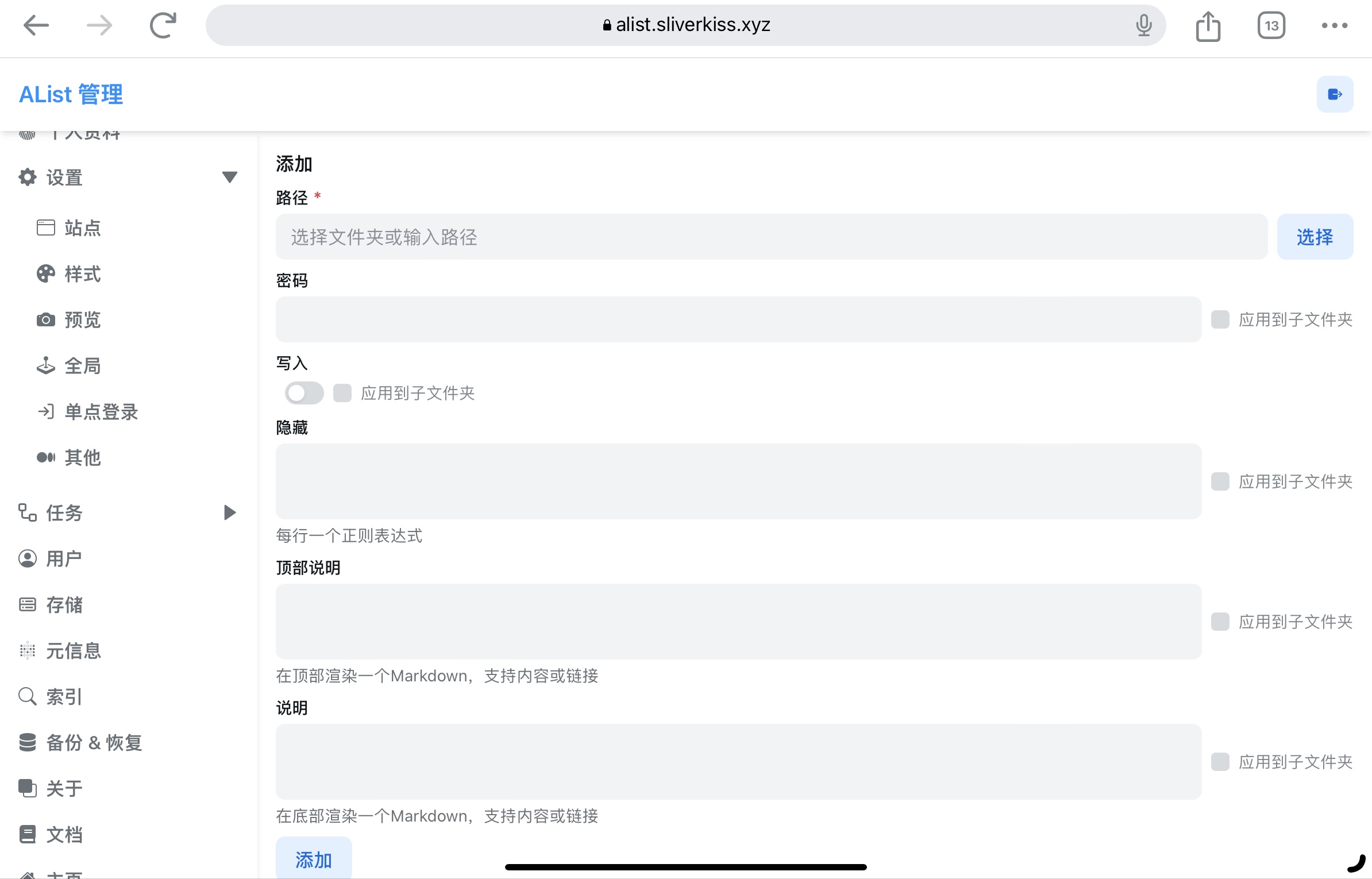
我在首页添加了一个公告显示。代码如下:
### 公告
该网盘仅供学习交流,请勿用于商业、盈利等用途。
美化结果
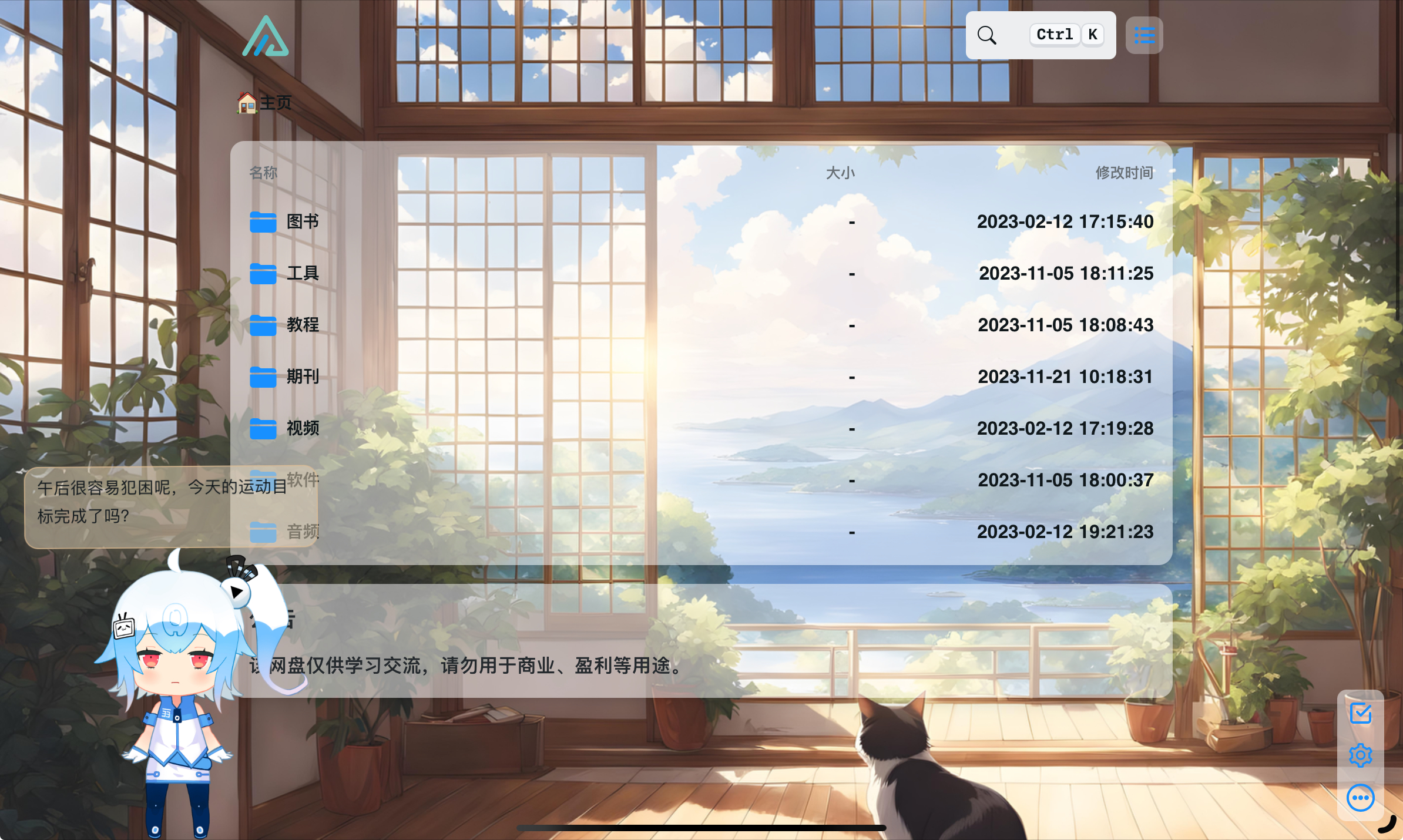
最终美化完成的页面如下所示: